
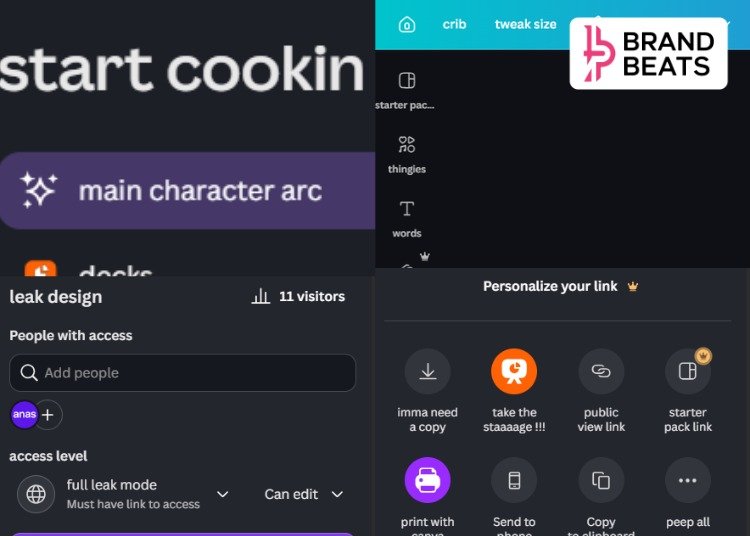
Canva has introduced a new language option called “English (chronically online)”, giving users the choice to navigate the platform using internet slang and meme-inspired phrases instead of conventional interface text.
The optional language setting reimagines Canva’s menus, prompts and system messages using expressions familiar to users immersed in online culture. Rather than changing the platform’s features or functionality, the update focuses entirely on tone, replacing standard interface copy with internet-native vocabulary and humour.
Users can enable the feature by heading to Your Account > Your Profile and selecting English (chronically online) from the language settings. The option sits alongside Canva’s existing language choices and can be switched on or off at any time.
The launch reflects a broader shift in how technology platforms are adapting their products to resonate with digitally native audiences, particularly Gen Z. Instead of limiting brand personality to social media, Canva has extended it directly into the product experience, making the interface itself part of its brand voice.
While the new setting retains Canva’s core tools and workflows, it introduces a more playful communication style throughout the platform. The update is designed as an optional experience, allowing users who enjoy internet culture to interact with Canva in a tone that mirrors the language commonly found across memes, social platforms and online communities, while leaving the standard English interface unchanged for everyone else.
The feature has quickly sparked conversation online, with users sharing Reels, screenshots and memes about Canva’s Gen Z-coded interface and its unusually internet-native tone.
View this post on Instagram
FAQs
1. What is Canva’s ‘Chronically Online’ language option?
Canva’s ‘English (chronically online)’ is an optional interface language that replaces standard menu labels and system text with internet slang and meme-inspired phrases, offering users a more playful experience while using the platform.
2. How can users enable Canva’s ‘Chronically Online’ language?
Users can enable the feature by going to Account > Your Profile > Language and selecting English (chronically online) from the available language options.
3. Does the new language option change Canva’s features?
No. The update only changes the wording of Canva’s interface. All design tools, features and functionality remain the same.
4. Why did Canva introduce a Gen Z-inspired language option?
The feature reflects Canva’s effort to embrace internet culture and create a more engaging product experience for digitally native users, particularly Gen Z, who are familiar with online slang and memes.
5. Is Canva’s ‘Chronically Online’ language available to all users?
Yes. The language option is available as an optional setting that users can switch on or off at any time without affecting the platform’s core functionality.